The R Language and Tidy Data Examples
2.7 Tidy Data
Each of the following datasets shows TB cases and some other variables per country organized in different ways.
## # A tibble: 6 × 4
##   country      year  cases population
##   <chr>       <dbl>  <dbl>      <dbl>
## 1 Afghanistan  1999    745   19987071
## 2 Afghanistan  2000   2666   20595360
## 3 Brazil       1999  37737  172006362
## 4 Brazil       2000  80488  174504898
## 5 China        1999 212258 1272915272
## 6 China 2000 213766 1280428583## # A tibble: 12 × 4
## country year type count
## <chr> <dbl> <chr> <dbl>
## 1 Afghanistan 1999 cases 745
## 2 Afghanistan 1999 population 19987071
## 3 Afghanistan 2000 cases 2666
## 4 Afghanistan 2000 population 20595360
## 5 Brazil 1999 cases 37737
## 6 Brazil 1999 population 172006362
## 7 Brazil 2000 cases 80488
## 8 Brazil 2000 population 174504898
## 9 China 1999 cases 212258
## 10 China 1999 population 1272915272
## 11 China 2000 cases 213766
## 12 China 2000 population 1280428583## # A tibble: 6 × 3
## country year rate
## <chr> <dbl> <chr>
## 1 Afghanistan 1999 745/19987071
## 2 Afghanistan 2000 2666/20595360
## 3 Brazil 1999 37737/172006362
## 4 Brazil 2000 80488/174504898
## 5 China 1999 212258/1272915272
## 6 China 2000 213766/1280428583## # A tibble: 3 × 3
## country `1999` `2000`
## <chr> <dbl> <dbl>
## 1 Afghanistan 745 2666
## 2 Brazil 37737 80488
## 3 China 212258 213766## # A tibble: 3 × 3
## country `1999` `2000`
## <chr> <dbl> <dbl>
## 1 Afghanistan 19987071 20595360
## 2 Brazil 172006362 174504898
## 3 China 1272915272 1280428583There are three interrelated rules which make a dataset tidy:
- Each variable must have its own column.
- Each observation must have its own row.
- Each value must have its own cell.
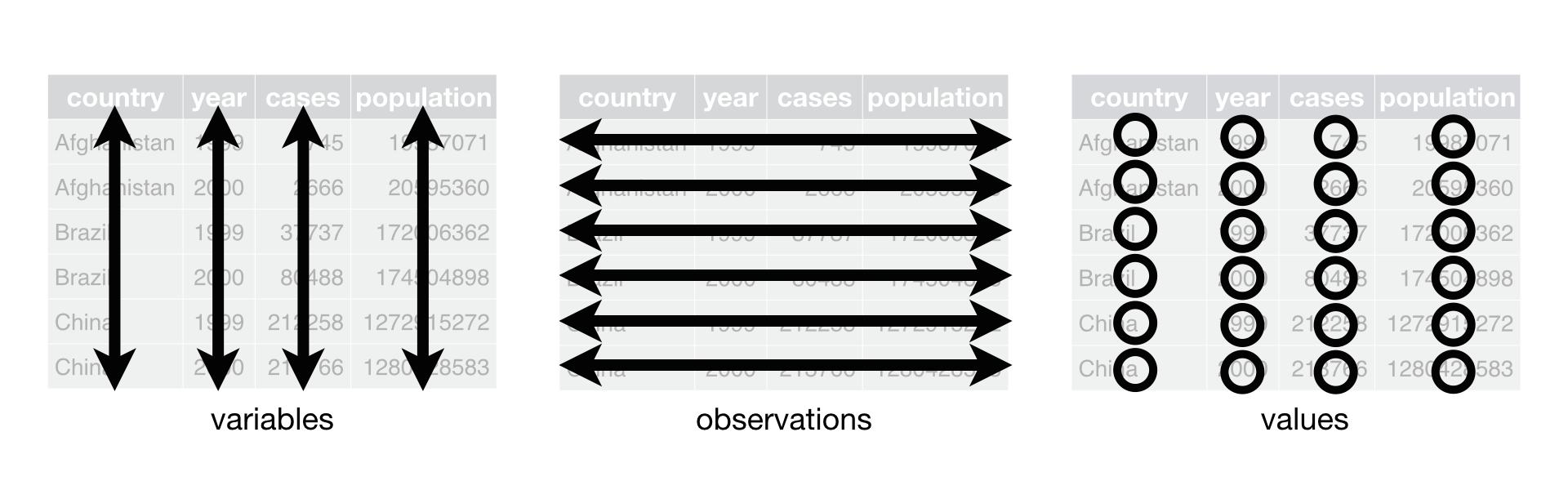
Which table above is Tidy?
## # A tibble: 6 × 4
##   country      year  cases population
##   <chr>       <dbl>  <dbl>      <dbl>
## 1 Afghanistan  1999    745   19987071
## 2 Afghanistan  2000   2666   20595360
## 3 Brazil       1999  37737  172006362
## 4 Brazil       2000  80488  174504898
## 5 China        1999 212258 1272915272
## 6 China 2000 213766 1280428583## # A tibble: 12 × 4
## country year type count
## <chr> <dbl> <chr> <dbl>
## 1 Afghanistan 1999 cases 745
## 2 Afghanistan 1999 population 19987071
## 3 Afghanistan 2000 cases 2666
## 4 Afghanistan 2000 population 20595360
## 5 Brazil 1999 cases 37737
## 6 Brazil 1999 population 172006362
## 7 Brazil 2000 cases 80488
## 8 Brazil 2000 population 174504898
## 9 China 1999 cases 212258
## 10 China 1999 population 1272915272
## 11 China 2000 cases 213766
## 12 China 2000 population 1280428583## # A tibble: 6 × 3
## country year rate
## <chr> <dbl> <chr>
## 1 Afghanistan 1999 745/19987071
## 2 Afghanistan 2000 2666/20595360
## 3 Brazil 1999 37737/172006362
## 4 Brazil 2000 80488/174504898
## 5 China 1999 212258/1272915272
## 6 China 2000 213766/1280428583## # A tibble: 3 × 3
## country `1999` `2000`
## <chr> <dbl> <dbl>
## 1 Afghanistan 745 2666
## 2 Brazil 37737 80488
## 3 China 212258 213766## # A tibble: 3 × 3
## country `1999` `2000`
## <chr> <dbl> <dbl>
## 1 Afghanistan 19987071 20595360
## 2 Brazil 172006362 174504898
## 3 China 1272915272 1280428583Why ensure that your data is tidy? There are two main advantages:
There’s a general advantage to picking one consistent way of storing data. If you have a consistent data structure, it’s easier to learn the tools that work with it because they have an underlying uniformity.
There’s a specific advantage to placing variables in columns because it allows R’s vectorised nature to shine. As you learned in mutate and summary functions, most built-in R functions work with vectors of values. That makes transforming tidy data feel particularly natural.
2.7.1 Let’s make a data dictionary for this dataset
country = The country in which TB case data was reported. year = Calendar year cases = Test-positive cases with culture-based and ELISA-based tests in these countries with sample dates within the year above. population = The self-reported population of each country according to their census data.
2.8 R Basics
2.8.1 Data types
You can create objects (variables~values, large data structures~think spreadsheets and databases, and functions) using the =, <- or -> operators. You can see what type of data (or data type) a variable is using the class function. Go ahead, try class(x). Data in R can be of several different, basic types:
| Data Type | aka | Example |
|---|---|---|
| Logical | Boolean | TRUE, FALSE |
| Numeric | float | 42, 3.14, |
| Character | string | ‘a’ , “good”, “TRUE”, ‘23.4’ |
| Integer | 2L, 34L, 0L | |
| Complex | 3 + 2i | |
| Raw | hexadecimal | “Hello” is stored as 48 65 6c 6c 6f |
2.8.2 Functions
What is a function?
function_name(argument_name = argument_value)
Using Tab-complete to make function calls will prevent errors!
2.9 Data, tibbles, dataframes
2.9.1 Reading in data
## # A tibble: 1,609 × 14
##    Date                County monthly.ppt max.daily.ppt rain.shortage
##    <dttm>               <dbl>       <dbl>         <dbl>         <dbl>
##  1 1981-06-01 00:00:00  24015        4.21         0.826          1.23
##  2 1982-05-01 00:00:00  24015        3.67         2.02           4.06
##  3 1983-04-01 00:00:00  24019        7.03         2.21           2.33
##  4 1983-07-01 00:00:00  24047        1.94         0.915          5.32
##  5 1983-08-01 00:00:00  24015        2.00         0.992          6
##  6 1984-03-01 00:00:00  51001        6.85         1.77           1.87
##  7 1984-05-01 00:00:00  10005        7.64         2.60           3.81
##  8 1985-09-01 00:00:00  51001        5.73         4.65           4.53
##  9 1988-05-01 00:00:00  10003        6.03         2.12           1.68
## 10 1989-03-01 00:00:00  10003        4.57         1.06           3.23
## # ℹ 1,599 more rows
## # ℹ 9 more variables: max.5.day.ppt <dbl>, monthly.tmin <dbl>,
## #   monthly.tmax <dbl>, ndays.more.30tmax <dbl>, Hazard <chr>, TotalLoss <dbl>,
## #   TotalLoss_drought <dbl>, TotalLoss_heat <dbl>, TotalLoss_storm <dbl>
Each column is a vector!
## [1] TRUE## [1] FALSE## # A tibble: 6 × 14
## Date County monthly.ppt max.daily.ppt rain.shortage
## <dttm> <dbl> <dbl> <dbl> <dbl>
## 1 1981-06-01 00:00:00 24015 4.21 0.826 1.23
## 2 1982-05-01 00:00:00 24015 3.67 2.02 4.06
## 3 1983-04-01 00:00:00 24019 7.03 2.21 2.33
## 4 1983-07-01 00:00:00 24047 1.94 0.915 5.32
## 5 1983-08-01 00:00:00 24015 2.00 0.992 6
## 6 1984-03-01 00:00:00 51001 6.85 1.77 1.87
## # ℹ 9 more variables: max.5.day.ppt <dbl>, monthly.tmin <dbl>,
## # monthly.tmax <dbl>, ndays.more.30tmax <dbl>, Hazard <chr>, TotalLoss <dbl>,
## # TotalLoss_drought <dbl>, TotalLoss_heat <dbl>, TotalLoss_storm <dbl>2.9.2 Factors
Factors are categorical variables.
## [1] Severe Storm/Thunder Storm Severe Storm/Thunder Storm
## [3] Severe Storm/Thunder Storm Severe Storm/Thunder Storm
## [5] Severe Storm/Thunder Storm Severe Storm/Thunder Storm
## Levels: Severe Storm/Thunder Storm
# can you add new values to factors?
Hazard_fac <- as.factor(storm$Hazard)
Hazard_fac[1] <- "not severe"## Warning in `[<-.factor`(`*tmp*`, 1, value = "not severe"): invalid factor
## level, NA generated## [1] <NA> Severe Storm/Thunder Storm
## [3] Severe Storm/Thunder Storm Severe Storm/Thunder Storm
## [5] Severe Storm/Thunder Storm Severe Storm/Thunder Storm
## Levels: Severe Storm/Thunder Storm# adding new values without the levels can result in odd behavior
storm$Hazard |> as.factor() |> c("not severe") |> tail()## [1] "1" "1" "1" "1" "1"
## [6] "not severe"How would we check that a variable only contains certain values?
## [1] 1609## [1] "Severe Storm/Thunder Storm"## Date County monthly.ppt max.daily.ppt rain.shortage max.5.day.ppt
## [1,] FALSE FALSE FALSE FALSE FALSE FALSE
## [2,] FALSE FALSE FALSE FALSE FALSE FALSE
## [3,] FALSE FALSE FALSE FALSE FALSE FALSE
## [4,] FALSE FALSE FALSE FALSE FALSE FALSE
## [5,] FALSE FALSE FALSE FALSE FALSE FALSE
## [6,] FALSE FALSE FALSE FALSE FALSE FALSE
## monthly.tmin monthly.tmax ndays.more.30tmax Hazard TotalLoss
## [1,] FALSE FALSE FALSE FALSE FALSE
## [2,] FALSE FALSE FALSE FALSE FALSE
## [3,] FALSE FALSE FALSE FALSE FALSE
## [4,] FALSE FALSE FALSE FALSE FALSE
## [5,] FALSE FALSE FALSE FALSE FALSE
## [6,] FALSE FALSE FALSE FALSE FALSE
## TotalLoss_drought TotalLoss_heat TotalLoss_storm
## [1,] FALSE FALSE FALSE
## [2,] FALSE FALSE FALSE
## [3,] FALSE FALSE FALSE
## [4,] FALSE FALSE FALSE
## [5,] FALSE FALSE FALSE
## [6,] FALSE FALSE FALSE